Parivar-bg-design
manage-multiple-communities-from-one-account

How to Manage Multiple Communities & Samajs from One Parivar Account

  • Kanishka Panchal

  • July 17, 2026 8 min read

TABLE OF CONTENTS

    • 1. One Account. Multiple Communities.
    • 2. Switch Between Communities Instantly
    • 3. Keep Every Community Organized
    • 4. Different Roles for Different Communities
    • 📱 Available on Android and iOS

Introduction

If you're active in your samaj, chances are you're also involved in other communities. Maybe you're an admin for your housing society, help organize your family's trust, or coordinate a cultural association. Managing multiple communities is rewarding, but it can quickly become overwhelming when everything is scattered across social media groups, spreadsheets, emails, and different apps. So, where and how do you actually manage all of it?

That's exactly why the Parivar app was built.

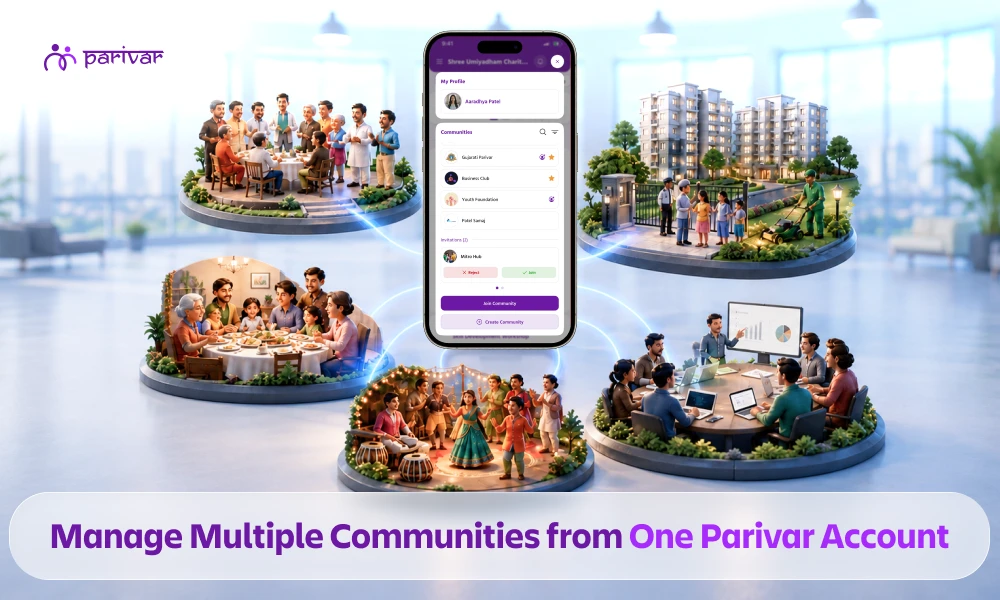
With Parivar, you can manage multiple communities, samajs, societies, and family groups from a single account.

Why One Person Often Ends Up Managing Multiple Communities

Community leaders are rarely appointed because they asked for the job.

They become the go-to person because they're reliable, organized, and willing to help.

Before you know it, you're handling:

Each community has different members, different events, and different responsibilities.

The challenge is managing everything in different places.

The Problem With Using Separate Apps or Groups

Most communities still rely on a combination of social media groups, email chains, sheets, and separate community apps.

Initially, it seems manageable.

But as communities grow, problems start appearing:

  • Important announcements get buried in chats.
  • Event updates reach the wrong audience.
  • Member directories become outdated.
  • Admins lose track of requests and approvals.
  • Community information gets mixed between groups.

When you're managing multiple communities, switching between several apps becomes both inefficient and stressful.

How Parivar Lets You Manage Multiple Communities from a Single Account

1. One Account. Multiple Communities.

Instead of creating separate accounts or downloading different apps, Parivar lets you manage every community from one login.

Whether you're part of:

  • A Samaj
  • A Housing Society
  • A Family Community
  • A Religious Organization
  • A Cultural Association
  • A Business Community

everything is available inside one app.

Simply sign in once and access every community you're connected with.

Each community remains completely independent while being just one tap away.

2. Switch Between Communities Instantly

One of Parivar's biggest advantages is how easy it is to move between communities.

There's no need to:

  • Log out
  • Log back in
  • Switch devices
  • Open different applications

Just select the community you want to access.

When you're inside your housing society, you'll only see:

  • Society announcements
  • Maintenance updates
  • Resident directory
  • Society events

Switch to your samaj, and you'll immediately see:

  • Community announcements
  • Family directory
  • Matrimony profiles
  • Religious events
  • Business directory

Every community has its own dedicated workspace.

Nothing overlaps.

3. Keep Every Community Organized

Each community in Parivar maintains its own:

That means:

  • Housing society updates never appear inside your samaj.
  • Samaj announcements never reach your cultural association.
  • Family information stays private within the right community.

This structured separation eliminates one of the biggest challenges faced by community administrators.

4. Different Roles for Different Communities

Not every community needs you to be the primary administrator.

Parivar allows role-based access for every community independently.

For example, you can be:

  • Super Admin for your Samaj
  • Co-Admin for your Housing Society
  • Committee Member for your Cultural Association
  • Regular Member in another community

Each community can have its own administrators, moderators, and volunteers.

This makes collaboration easier while reducing the workload on a single person.

Real-Life Example

Meet Raj.

Raj is involved in three different communities.

  • He manages his family's samaj.
  • He's a co-admin for his apartment society.
  • He's a regular member of a Gujarati cultural association.

Every morning, Raj opens Parivar.

  • He first reviews maintenance requests in his housing society.
  • Next, he switches to his samaj to publish an announcement for the upcoming annual gathering and reviews event registrations.
  • Later in the evening, he checks discussions in the cultural association and joins a conversation without needing any admin privileges there.

Everything happens from one account without any multiple logins, switching apps or confusion.

Why Community Leaders Choose Parivar

Parivar is designed specifically for communities and organizations.

With Parivar, you can:

Whether you're managing one samaj or several communities, Parivar keeps everything organized in one place.

Get Started Today

If you're tired of juggling multiple WhatsApp groups, spreadsheets, and community apps, it's time to simplify your community management.

With Parivar, you can manage all your communities from a single account while keeping every group organized, secure, and independent.

Start building stronger, better-connected communities today.

Download Parivar today and manage every community from one powerful platform.

📱 Available on Android and iOS


TABLE OF CONTENTS

    • 1. One Account. Multiple Communities.
    • 2. Switch Between Communities Instantly
    • 3. Keep Every Community Organized
    • 4. Different Roles for Different Communities
    • 📱 Available on Android and iOS

ABOUT

Parivar - Bringing all community members together at your fingertips, the community engagement app will let you connect with your community conveniently.

Frequently Asked Questions

Can I manage multiple samajs from one Parivar account?

Yes. Parivar allows you to join and manage multiple samajs and communities using a single account. Each community remains completely separate with its own members, announcements, and events.

No. Every community has its own private space. Member directories, announcements, events, and other content are only visible within that specific community.

Absolutely. You can be an admin in one community, a co-admin in another, and a regular member elsewhere. Roles and permissions are managed independently for each community.

Yes. Parivar is designed for samajs, housing societies, family communities, religious organizations, cultural associations, trusts, and many other community types.

No. One Parivar account gives you access to all the communities you're part of. You can switch between them instantly without logging out.

Recent Blogs

View all
nri-families-celebrate-raksha-bandhan-across-time-zones

How NRI Families Celebrate Raksha Bandhan Across Time Zones

  • Kanishka Panchal
support-local-business-in-community

How to Support Local Businesses Within Your Community

  • Kanishka Panchal
how-to-onboard-new-members-into-community

How to Onboard New Members Into Your Community (Step by Step)

  • Kanishka Panchal